In an age where smart technology seamlessly integrates into our daily lives, securing your home has never been more intuitive. The front door, once a simple barrier, has transformed into a sophisticated surveillance point thanks to innovations like the Nest Hello Video Doorbell. Originally a pioneer in the smart doorbell market, the Nest Hello offers more than just a chime; it provides a comprehensive security solution, giving you eyes and ears at your doorstep, whether you’re home or away. This guide will explore its features, benefits, how it stacks up against newer models, and essential tips for installation and troubleshooting, helping you decide if this wired wonder is the right guardian for your home.
What is the Nest Hello Video Doorbell and Why Do You Need It?
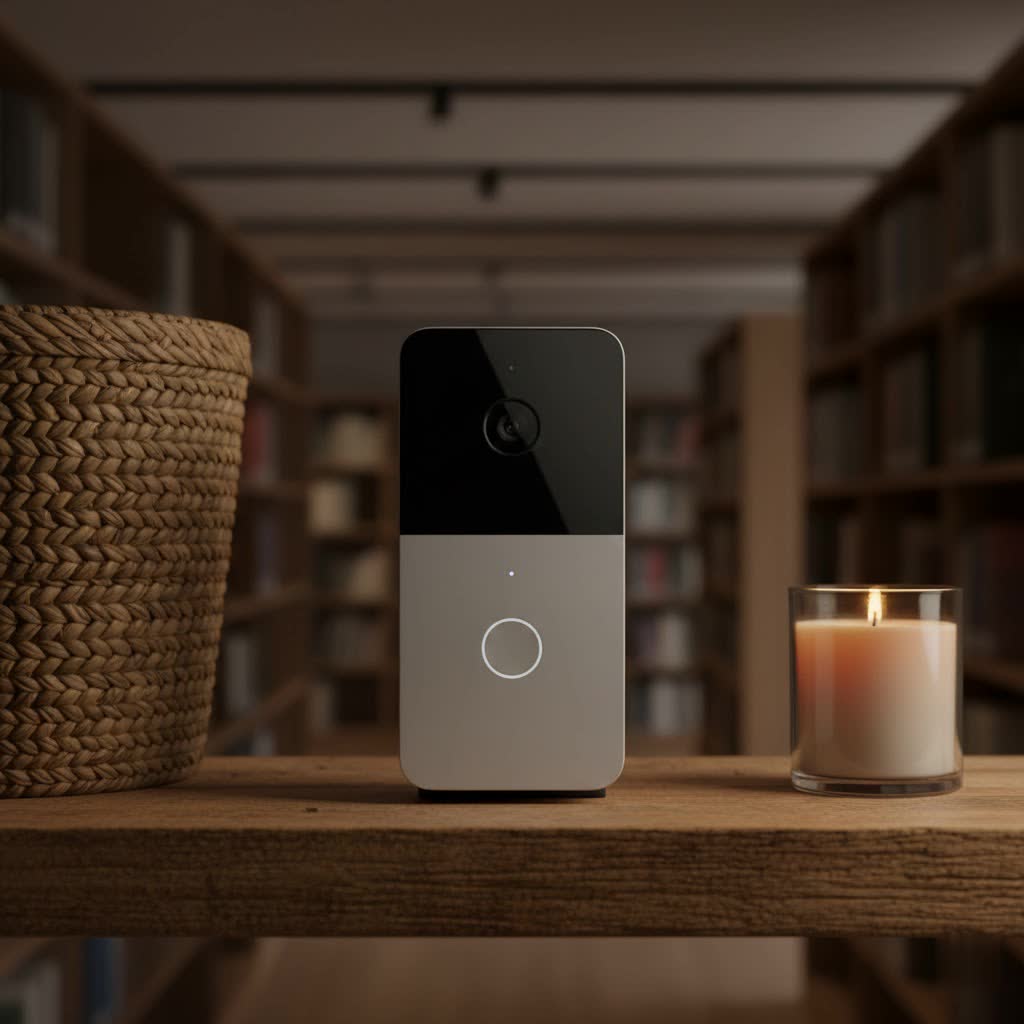
The Nest Hello Video Doorbell, now officially known as the Google Nest Doorbell (wired) 1st generation, is a smart doorbell camera designed to enhance your home’s security and convenience. Unlike traditional doorbells, it integrates a high-definition camera, two-way audio, and intelligent alerts, all accessible through your smartphone via the Nest app.
Its purpose extends far beyond simply notifying you of visitors. With a Nest Hello, you gain:
- Enhanced Security: Enjoy peace of mind with 24/7 monitoring of your doorstep. The doorbell continuously records, ensuring you never miss a moment, and its advanced detection features can differentiate between people, packages, and even familiar faces, sending you tailored alerts.
- Unrivaled Convenience: Answer your door from anywhere in the world, speak to visitors in real-time, or use pre-recorded messages when you’re busy. This means never missing a delivery or having to rush to the door.
- Smarter Control: Seamlessly integrate the Nest Hello into your broader Nest smart home ecosystem. Manage settings, review video history, and customize alerts all from a single, intuitive app.
The Nest Hello is particularly valuable in various scenarios, from monitoring package deliveries to deterring potential intruders. It acts as your always-on sentinel, providing critical insights into activity at your home’s entry point.
Exploring the Nest Hello’s Core Features
The Nest Hello stands out with a robust set of features designed for optimal front-door surveillance and communication.
Video Quality and Field of View
|
Our Picks for the Best Video Doorbell in 2026
As an Amazon Associate I earn from qualifying purchases.
|
||
| Num | Product | Action |
|---|---|---|
| 1 | Blink Outdoor 4 – Wireless smart security camera, two-year battery life, 1080p HD day and infrared night live view, two-way talk. Sync Module Core included – 2 camera system |

|
| 2 | NariOrbi WiFi Video Doorbell Camera with Human Detection, Battery Powered, Night Vision, 2-Way Talk, 2.4G WiFi, Cloud Storage |
|
| 3 | Ring Indoor Cam, Home or business security in 1080p HD video, White |
|
| 4 | Blink Video Doorbell (newest model) – Head-to-toe HD view, two-year battery life, and simple setup. Required Sync Module not included – Add-On (White) |
|
| 5 | Ring Battery Doorbell (newest model), Home or business security with Head-to-Toe video, Live View with Two-Way Talk, and Motion Detection & Alerts, Satin Nickel |
|
| 6 | Blink Mini 2 — Home Security & Pet Camera with HD video, color night view, motion detection, two-way audio, and built-in spotlight — 1 camera (White) |
|
| 7 | Ring Battery Doorbell (newest model), Home or business security with Head-to-Toe video, Live View with Two-Way Talk, and Motion Detection & Alerts, Venetian Bronze |
|
| 8 | Tapo by TP-Link Smart Video Doorbell Camera Wireless with Chime, 2K with Full Color Night Vision & Spotlights, No Monthly Fee, Ring Call, 160° Ultra-Wide View, Free AI Detection, Local Storage,D210 |
|
| 9 | Noorio Wireless Doorbell Camera with Rechargeable Battery, 2K+ Resolution, 2-Way Audio, Color Night Vision, AI Motion Detection, Smart Video Doorbell Works with Alexa, D110 |
|
| 10 | Blink Video Doorbell (newest model) – Head-to-toe HD view, two-year battery life, and simple setup. Sync Module Core included – System (Black) |
|
The heart of any video doorbell is its camera, and the Nest Hello delivers. It records in a sharp 1600 x 1200 resolution at up to 30 frames per second, ensuring clear, detailed footage. High Dynamic Range (HDR) technology is built-in, helping to balance bright and shadowy areas for a consistently well-exposed image, even in challenging lighting conditions. Night vision capabilities automatically kick in after dark, providing clear visibility around the clock.
One of its most praised aspects is its 160-degree diagonal field of view and a 4:3 aspect ratio. This “head-to-toe” perspective is specifically designed to show you a full view of a person standing at your door, as well as packages left on the ground, minimizing blind spots.
Audio Capabilities
Communication is key, and the Nest Hello excels with HD two-way talk. A high-quality speaker and microphone, coupled with advanced noise and echo cancellation, ensure that conversations with visitors are clear and crisp, regardless of ambient noise. You can also send pre-recorded quick responses, a handy feature when you’re unable to speak directly.
Smart Alerts & AI
Beyond basic motion detection, the Nest Hello leverages artificial intelligence to provide more intelligent and actionable alerts:
- Person Detection: It can distinguish between a person and other moving objects, reducing irrelevant notifications caused by pets or passing cars.
- Familiar Face Alerts: With a Nest Aware subscription, this facial recognition feature can learn and identify people you know, notifying you by name when a familiar face is at the door. Conversely, it can alert you when an unfamiliar person is detected.
- Package Detection: Another valuable Nest Aware feature, it sends alerts when a package is delivered or if it senses someone might be attempting to remove one.
- Sound Detection: The doorbell can also alert you to loud sounds, such as breaking glass or a dog barking, adding another layer to your security monitoring.
24/7 Continuous Recording (with Nest Aware)
A significant differentiator for the Nest Hello is its ability to provide 24/7 continuous video recording with a Nest Aware subscription. This means the doorbell is always recording, allowing you to review a complete timeline of events, not just short clips triggered by motion. This comprehensive video history can be invaluable for reviewing incidents and understanding the full context of what happened at your doorstep.
Connectivity and Power
The Nest Hello is a wired-only device, requiring connection to your home’s existing doorbell wiring, chime, and a compatible transformer (typically 16V AC–24V AC, 10VA). This wired connection ensures a reliable power supply, enabling its continuous recording feature. It supports dual-band Wi-Fi (2.4GHz/5GHz) for stable internet connectivity and remote access.
Nest Hello vs. Newer Google Nest Doorbells: A Comparative Look
Google’s lineup of doorbells has expanded since the original Nest Hello. Understanding the differences is crucial when making a purchasing decision.
Nest Hello (Wired 1st Gen) vs. Nest Doorbell (Battery)
The most notable comparison is between the wired Nest Hello and the newer Nest Doorbell (battery).
- Power Source: The Nest Hello requires a wired connection for constant power, whereas the Nest Doorbell (battery) can run on its internal battery or be wired for continuous charging (though it won’t offer 24/7 recording if wired).
- Recording: Nest Hello provides 24/7 continuous video recording with a Nest Aware subscription. The Nest Doorbell (battery) offers free 3-hour event video history and records only when motion is detected, even if wired.
- Field of View & Aspect Ratio: The Nest Hello features a 4:3 aspect ratio and a 160-degree diagonal field of view. The battery model has a slightly different 3:4 aspect ratio and a 145-degree diagonal field of view, optimized for a taller view, often capturing more of the ground directly below the doorbell.
- App Ecosystem: The Nest Hello primarily operates within the Nest app, while the Nest Doorbell (battery) uses the Google Home app. This can be a significant factor for users with existing Nest devices.
- Backup: The battery model can continue recording during a power or Wi-Fi outage, a capability the wired Hello lacks.
Nest Hello (Wired 1st Gen) vs. Nest Doorbell (Wired 2nd Gen)
In 2022, Google released a second-generation wired doorbell, also called the Nest Doorbell (wired). While serving the same purpose, there are subtle distinctions:
- Design & Size: The 2nd Gen wired doorbell has a slightly different, often taller design compared to the more slender Nest Hello.
- Camera Specs: Interestingly, the 2nd Gen wired doorbell features a 1.3-megapixel camera, a lower megapixel count than the Nest Hello’s 3-megapixel sensor. However, Google claims software enhancements provide improved clarity. The 2nd Gen also has a 3:4 aspect ratio and 145-degree diagonal field of view, differing from the Hello’s 4:3 and 160-degree FOV.
- Weather Resistance: The Nest Hello has an IPX4 rating (splash-resistant), while the 2nd Gen wired doorbell boasts an IP54 rating, offering better protection against dust and water.
- App Ecosystem: The 2nd Gen wired model is designed to work with the Google Home app, diverging from the Nest app used by the original Nest Hello.
- Free Features: Like the battery model, the 2nd Gen wired doorbell offers 3 hours of free event video history, which the original Nest Hello does not.
While the original Nest Hello still holds its own with 24/7 recording and a wider field of view, the newer wired model brings improved weather resistance and a different app experience.
Installation Guide: Setting Up Your Nest Hello Video Doorbell
Installing the Nest Hello, while straightforward for those with basic DIY skills, involves working with electrical wiring. It’s crucial to follow steps carefully or consider professional installation.
Pre-installation Checks
Before you begin, ensure compatibility:
- Existing Wiring: You need existing wired doorbell and chime.
- Transformer: Verify your transformer provides 16V AC–24V AC and 10VA. Insufficient power is a common issue.
- Tools: Gather essential tools including a Phillips head screwdriver, drill, masonry drill bit (for brick/stucco), and the special release tool included with your Nest Hello.
Step-by-Step Process
- Turn Off Power: Locate your home’s electrical panel and turn off the circuit breaker that controls your doorbell’s power. This is a critical safety step.
- Install Chime Connector: Go to your indoor chime box. The Nest Hello comes with a chime connector (often a small white device with wires) that must be installed on your chime’s
TRANSandFRONTterminals. This prevents issues like constant buzzing or insufficient power to the doorbell. - Remove Old Doorbell: Unscrew and carefully disconnect the two wires from your existing doorbell button. Secure the wires so they don’t retract into the wall.
- Mount Wall Plate: Pull the doorbell wires through the center hole of the Nest Hello wall plate. Position the plate, mark screw holes, and drill pilot holes (use the masonry bit if needed). Secure the wall plate. If a wedge is included and needed to angle the doorbell, install it now.
- Connect Wires: Attach your doorbell wires to the two screws on the back of the Nest Hello. It typically doesn’t matter which wire goes to which screw, but ensure they are secure and not touching.
- Attach Nest Hello: Slide the top of the Nest Hello onto the wall plate, then push the bottom until it clicks into place.
- Restore Power & App Setup: Turn the power back on at your circuit breaker. The Nest Hello’s light ring should illuminate blue. Download and open the Nest app, then follow the in-app instructions to add your device. This will involve scanning a QR code (found on the back of the doorbell or its packaging) and connecting it to your home Wi-Fi network.
While the Nest app provides clear guidance, if you’re uncomfortable with electrical work, professional installation is highly recommended.
Common Issues and Troubleshooting Your Nest Hello
Even a premium device like the Nest Hello can encounter occasional glitches. Here are some common problems and their solutions:
Power Problems (Blinking Yellow Light)
A blinking yellow or amber light on your Nest Hello often indicates insufficient power. This is a very common issue.
- Cause: Your existing transformer might not provide the required 16V AC–24V AC and 10VA, or the chime is drawing too much voltage.
- Fixes:
- Check Transformer: Verify your transformer’s output. If it’s too low, you may need to upgrade it to meet the Nest Hello’s requirements.
- Chime Connector: Ensure the chime connector is correctly installed. It’s essential for regulating power.
- Bypass Chime: As a temporary diagnostic or permanent solution (if you don’t use your indoor chime), you can bypass the chime to send direct power to the doorbell. This typically involves rewiring at the chime box, ensuring the Nest Hello receives consistent voltage. Only attempt this if you are comfortable with basic electrical wiring or consult an electrician.
Wi-Fi Connectivity Issues
If your Nest Hello frequently goes offline or fails to connect, it’s likely a Wi-Fi problem.
- Cause: Poor Wi-Fi signal strength, router issues, outdated app, or interference.
- Fixes:
- Reset Router/Modem: Power cycle your home router and modem. Wait a few minutes for them to fully restart before checking the doorbell.
- Update Nest App: Ensure your Nest app is updated to the latest version.
- Wi-Fi Booster/Extender: If the doorbell is far from your router, a Wi-Fi booster or mesh system can significantly improve signal strength.
- Factory Reset: As a last resort, you can perform a factory reset on the Nest Hello. This will require re-setting it up in the Nest app. Use the included release tool to remove the doorbell, then press the reset pinhole for 10 seconds while holding down the doorbell button.
Video/Audio Issues
Occasionally, you might experience blurry video, dropped frames, or unclear audio.
- Cause: Insufficient internet upload bandwidth, high video quality settings, or network congestion.
- Fixes:
- Check Bandwidth: The Nest Hello requires at least 2 Mbps upload speed (and 800-2000 Kbps while actively streaming). Test your internet speed.
- Adjust Video Quality: In the Nest app settings, you can often lower the video quality to reduce bandwidth usage.
- Network Optimization: Reduce other network activity or ensure your Wi-Fi channel isn’t overly congested.
Physical Degradation
Some early users reported issues with the protective covering on the Nest Hello peeling or cracking over time, especially in harsh weather conditions. While not universal, this is something to be aware of for older units.
Conclusion
The Nest Hello Video Doorbell, despite its rebranding and the emergence of newer models, remains a highly capable and reliable smart home security device. Its commitment to 24/7 continuous recording, sharp HD video with a broad field of view, and intelligent person and package detection—especially when paired with Nest Aware—sets a high standard for wired video doorbells. While the initial wired installation and ongoing subscription for advanced features are considerations, the peace of mind and unparalleled control it offers over your home’s entry point are significant advantages.
For those seeking robust, always-on protection and seamless integration within the Nest ecosystem, the Nest Hello continues to be a compelling choice. It’s more than just a doorbell; it’s a vigilant guardian, a communication hub, and a key component of a smarter, more secure home. Are you ready to experience smarter home security at your doorstep?
Frequently Asked Questions
Is the Nest Hello still supported by Google?
Yes, the Nest Hello (now known as the Google Nest Doorbell wired 1st Gen) is still supported and receives updates. However, newer Google Nest doorbells (battery and 2nd Gen wired) primarily use the Google Home app, while the Nest Hello uses the Nest app.
Does Nest Hello require a subscription?
While basic features like live streaming and two-way talk are free, the Nest Hello requires a paid Nest Aware subscription to access advanced features like 24/7 continuous video recording, familiar face alerts, and extended video history.
Can I install the Nest Hello myself?
Yes, many users with basic DIY skills and an existing wired doorbell system can install the Nest Hello. However, it involves working with electrical wiring and requires installing a chime connector. If you are uncomfortable, professional installation is recommended.
What’s the difference between Nest Hello and Nest Doorbell (battery)?
The Nest Hello is a wired-only doorbell offering 24/7 continuous recording with Nest Aware. The Nest Doorbell (battery) can be wired or battery-powered, but only offers event-based recording (even when wired) and includes 3 hours of free event video history. They also use different apps (Nest vs. Google Home).
Does Nest Hello work with Google Home?
Yes, the Nest Hello integrates with Google Home and Google Assistant, allowing you to receive announcements on Google Home devices when someone rings the doorbell or is detected. You can also view the video feed on compatible smart displays.
What voltage does Nest Hello need?
The Nest Hello requires an existing doorbell transformer that provides 16V AC–24V AC and 10VA (Volt-Amperes) of power. Ensure your transformer meets these specifications for optimal performance and to prevent power-related issues.
Why is my Nest Hello blinking yellow?
A blinking yellow light on your Nest Hello typically indicates that it is receiving insufficient power. This can be caused by an underpowered transformer or issues with the chime connector. Troubleshooting involves checking your transformer, ensuring correct chime connector installation, or potentially bypassing the chime.
